Kanmail vs Superhuman
Both make email faster. One rents you the privilege every month; the other you buy once and own. Here’s the honest side-by-side.
 Kanmail
$49
once · yours forever
- ✓Pay once, no subscription
- ✓Kanban board, any IMAP account
- ✓Mac, Windows & Linux
$25/mo
per user, billed annually · forever
- –Subscription, every month
- –List inbox, Gmail & Outlook only
- –No Linux client
Side by side
Every cell below is a published fact, not a hot take.
KanmailSuperhuman pricing: Starter $25/user/mo billed annually ($300/yr; $30/mo month-to-month); Gmail & Outlook only. Verified June 2026.
The same inbox, for 30× less.
Superhuman is a great product. It’s also a meter that never stops running. Here’s what each costs you to keep using.
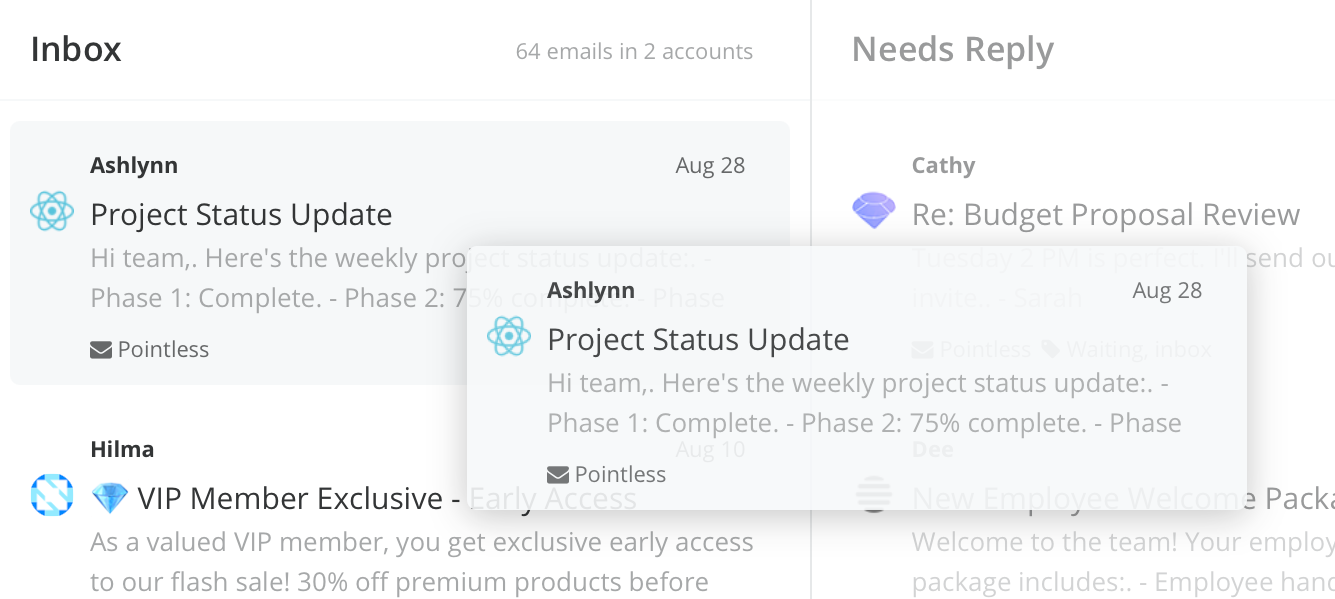
Board, not a list
Superhuman makes the
list faster. Kanmail
replaces it.
Both fly on the keyboard. But a faster scroll is still a scroll; Kanmail turns email into columns you move things through, so you see what’s in flight at a glance instead of triaging top to bottom.
Runs where you do
Including Linux.
Superhuman is Gmail & Outlook on Mac and mobile. Kanmail is the same app and license on Mac, Windows and Linux connected to any IMAP/SMTP account.
Your mail, your machine
No middleman servers.
Kanmail talks straight to your provider, nothing routed through someone else’s cloud for processing. Tracking pixels are blocked by default, so senders can’t tell when you opened anything.
Where Superhuman wins
A comparison that only flatters us wouldn’t be worth reading. If these matter more to you than owning your client, Superhuman is the better fit.
AI that drafts for you
Auto-summaries, Ask AI and generated replies. Kanmail is deliberately AI-free — if that’s the headline feature you want, theirs is excellent.
A famously polished feel
Years of obsessive interaction design. Kanmail is sharp and fast, but Superhuman’s fit-and-finish is its own art form.
Guided hand-holding
A 1-on-1 onboarding session to rewire your habits. Some people love it; if you’d rather just open an app, that cuts the other way.
Stop renting your inbox
$49. Once.
Try Kanmail free for as long as you need — no card, no onboarding call. Switch the day it clicks.
Wondering how paying once works? The email client you buy once →